.jpg)
Remote Team Collaboration in 2026: A Remote-First Guide to Building Teams That Actually Work
Let me be honest with you. When we started building our distributed team back in 2021, we thought remote work was a temporary adjustment. A stopgap. Something we would revisit once the world opened back up. Five years later, we have a team of 47 people across 14 countries, zero office leases, and some of the highest productivity numbers we have ever seen.
That shift did not happen by accident. It happened because we stopped treating remote as a compromise and started treating it as the actual design principle. We went remote-first. And in 2026, that distinction matters more than ever.
This guide is for founders, team leads, and operations people who are serious about making distributed work function at a high level. We will cover the strategies, the remote work tools, and the distributed team software that actually move the needle, along with the cultural decisions that hold everything together.
Why Remote-First Is Not the Same as Remote-Friendly
This is the most important concept in this entire post. Most companies that struggle with remote team collaboration are remote-friendly, not remote-first. The difference is architectural, not cosmetic.
A remote-friendly company allows people to work from home. A remote-first company designs every process, communication system, and workflow assuming that no one is in the same physical space. Documentation is not an afterthought. Meetings are not the primary way decisions get made. Tools are not adopted because someone thought they looked cool. They are chosen because they solve a real coordination problem for a distributed team.
According to a 2025 State of Remote Work report by Buffer, 98% of remote workers want to continue working remotely at least some of the time. But more telling is the data from GitLab's annual remote work survey, which found that companies with formal remote-first policies report 29% higher employee satisfaction and 23% lower voluntary turnover compared to remote-friendly companies that still center office culture.
In 2026, the talent market rewards the companies that get this right. Engineers, designers, product managers, and operators are choosing employers the same way they choose cities to live in. They want intentional environments that support the way they actually work.
The Core Pillars of Remote Team Collaboration
Before we talk tools, let us talk structure. Remote team collaboration breaks down when organizations skip the foundation and jump straight to software. Here are the four pillars that every distributed team needs to get right.
1. Asynchronous Communication by Default
The biggest mindset shift in a remote-first organization is moving from synchronous to asynchronous communication as the default. That does not mean you never meet. It means that most information sharing, decision-making, and feedback happens through written, recorded, or structured formats that do not require everyone to be online at the same time.
At our company, we have a rule: if a decision can be made asynchronously, it should be. We use a simple decision log in Notion where proposals are written out, context is shared, and team members have 48 hours to comment before a decision moves forward. This single practice eliminated about 60% of our weekly meetings in the first six months.
Asynchronous communication also scales. When you are coordinating across time zones in New York, Berlin, Singapore, and Lagos, synchronous communication is not just inconvenient. It is mathematically impossible to do well without burning someone out.
2. Documentation as Infrastructure
Distributed teams that document well move faster than co-located teams that rely on hallway conversations. That sounds counterintuitive, but it is true.
When institutional knowledge lives in someone's head or in a Slack thread from 18 months ago, your team slows down every time someone needs to make a decision. When that same knowledge is in a well-structured wiki, onboarding takes days instead of weeks, decisions get made faster, and the team stops depending on the same three people for answers.
A McKinsey analysis from 2025 found that knowledge workers spend an average of 19% of their workweek searching for information or tracking down colleagues to get answers. In a remote-first company with strong documentation practices, that number drops to around 8%. That is nearly a full extra day of productive work per person per week.
3. Intentional Culture Building
Culture does not happen by accident in any company. In a remote team, you have to work harder because you do not have physical proximity doing any of the work for you. No one bumps into each other in the kitchen. No one reads body language in a meeting room. The culture you build is almost entirely the result of deliberate choices.
This means creating rituals. Weekly team calls that are genuinely worth attending. Virtual coffee chats that are scheduled, not optional guilt trips. Company channels dedicated to interests outside of work. Recognition systems that surface good work publicly. Celebration of milestones in a way that people actually feel.
One of the best investments we made was hiring a Head of Remote Experience. That title would have sounded absurd in 2019. In 2026, it is a competitive differentiator.
4. Clear Accountability Structures
Remote work does not fail because people are lazy. It fails because accountability structures are unclear. When no one knows who owns what, or when deadlines are fuzzy, remote teams drift. This gets amplified across time zones because there is no physical visibility to compensate for unclear structure.
We use a simple framework: every project has one directly responsible individual (DRI). That person is not necessarily doing all the work. They are accountable for the outcome. This single practice removed an enormous amount of ambiguity from our distributed operations.
The Best Remote Work Tools in 2026
The remote work tools landscape has matured significantly. There was a period around 2020 to 2023 where every team was drowning in apps. By 2026, the market has consolidated and the category leaders have become meaningfully better. Here is how we think about the stack.
Communication Tools
Slack and Microsoft Teams remain dominant for real-time messaging, but the conversation around them has shifted. The question is no longer which messaging tool to use. It is how to use it without creating a culture of constant interruption.
Best practices we have seen work well across distributed teams include:
- Setting channel-specific norms for response times so that urgent and non-urgent messages have different homes
- Using status settings and focus modes consistently so teammates know when someone is available
- Treating direct messages with the same intentionality as email, not as a real-time chat expectation
- Creating structured threads for decisions rather than letting them get buried in message streams
For video communication, Loom has become one of the most valuable remote work tools for asynchronous video updates. Instead of scheduling a meeting to share a product update or give design feedback, you record a two-minute video. The receiver watches it when they are ready. It is faster, less disruptive, and often clearer than a live call.
Project Management and Distributed Team Software
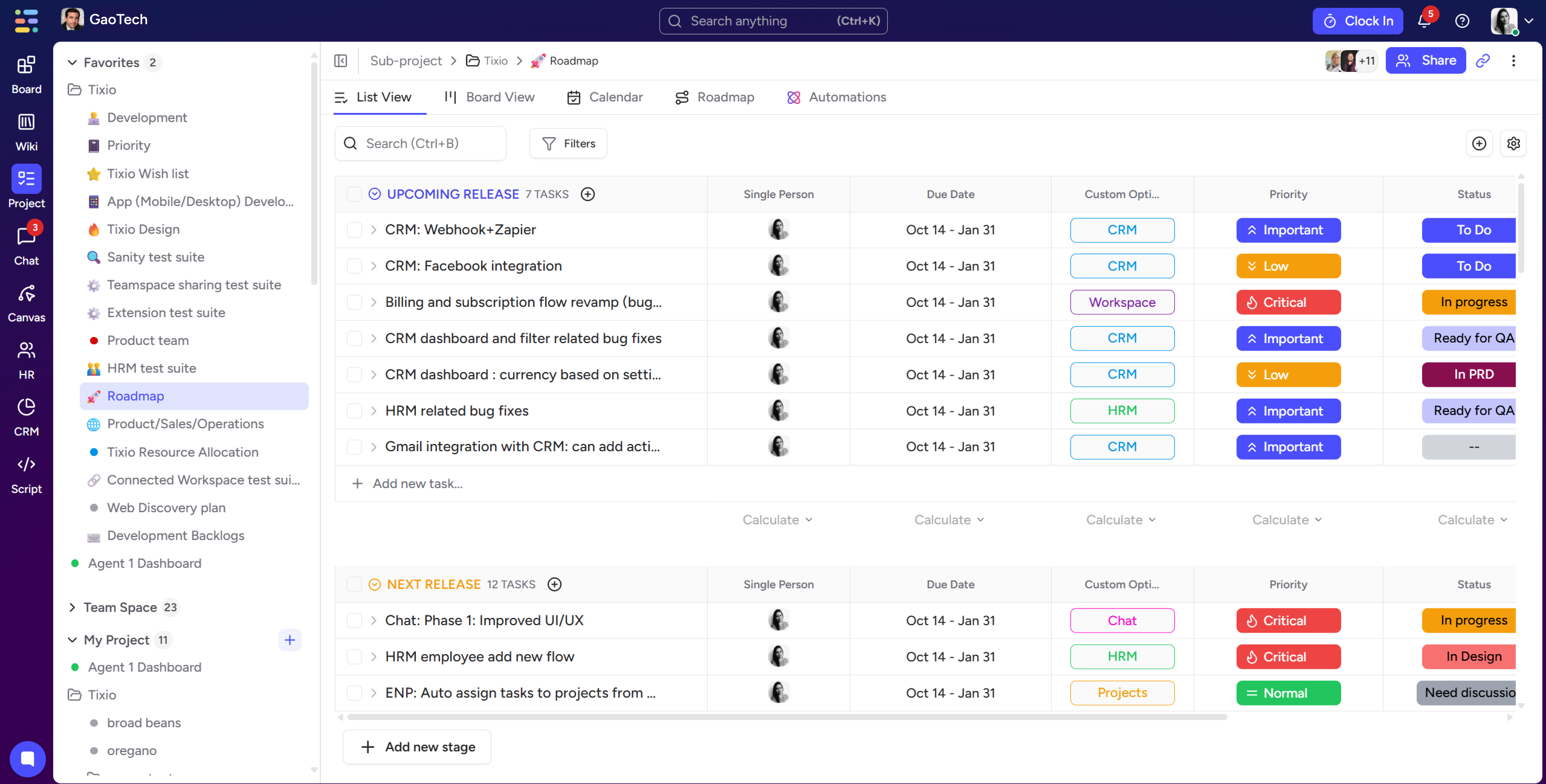
In 2026, project management has become the connective tissue of distributed team software ecosystems. The leaders in this space are Linear for engineering teams, Notion for knowledge-forward organizations, and Asana or Monday for teams that need more structured workflow management.
What distinguishes the best distributed team software from the mediocre options is not the feature list. It is the degree to which the tool makes work visible. When your team is not in the same room, visibility into who is working on what, where things stand, and what is blocked becomes mission-critical.
Key features to prioritize in distributed team software include:
- Real-time status updates that do not require people to manually check in
- Integration with communication tools so context stays connected to tasks
- Time zone awareness in scheduling and deadline features
- Clear ownership and dependency tracking
- Audit trails so decision context is preserved over time
Documentation and Knowledge Management
Notion, Confluence, and Coda are the primary players in documentation and knowledge management for distributed teams. Each has its strengths. Notion is highly flexible and beloved by startups. Confluence integrates deeply with the Atlassian ecosystem. Coda blends documents with databases in a way that suits operational teams.
Regardless of which tool you choose, the principle matters more than the platform. Your documentation system should have a clear structure, consistent ownership, and regular maintenance. A wiki that no one updates is worse than no wiki at all because it creates false confidence and outdated information.
Meeting and Scheduling Tools
Meetings in remote-first organizations are expensive. Every meeting has a cost in attention, time zones, and energy. The best remote work tools in this category help reduce that cost.
Calendly and Cal.com handle scheduling without the back-and-forth. Clockwise uses AI to protect focus time and optimize calendar configurations across teams. For meeting facilitation, Miro and FigJam are excellent for collaborative workshops, planning sessions, and retrospectives that actually engage distributed participants.
One tool category that has exploded in 2026 is the AI meeting assistant. Tools like Otter.ai, Fireflies, and Fathom transcribe, summarize, and extract action items from meetings automatically. This is not a nice-to-have for a distributed team. It is essential infrastructure. Someone in Singapore should not miss a critical decision because they could not attend a meeting at 3 AM.
Building a Remote-First Hiring and Onboarding Process
Collaboration starts before someone's first day. The hiring and onboarding experience sets the tone for how well a new team member will integrate into a distributed environment. Most companies underinvest here, and it costs them in the first 90 days.
Hiring for Remote Readiness
Remote-first companies in 2026 have learned to screen for remote readiness alongside role-specific skills. This does not mean requiring five years of remote experience. It means looking for:
- Strong written communication skills, because so much of distributed collaboration happens in text
- Self-direction and comfort with ambiguity, because remote work rewards initiative
- Proactive communication habits, because no one is watching over shoulders
- Comfort with asynchronous tools and workflows
The interview process itself should demonstrate remote-first values. Use asynchronous assessments. Record interview questions for candidates in different time zones. Make the hiring process a preview of the actual working experience.
Onboarding for Distributed Teams
The first 30 days for a remote employee is the highest-risk period for disconnection. You cannot rely on organic socialization to do the work. You have to engineer belonging.
Effective remote onboarding includes a structured 30-60-90 day plan with clear milestones, an onboarding buddy who is not the direct manager, a curated set of documentation the new hire should read in the first week, scheduled one-on-ones with key team members across the organization, and a deliberate introduction to company culture, rituals, and norms.
According to a Gallup study published in late 2025, employees who have a structured onboarding experience are 69% more likely to remain at the company for three or more years. For remote teams, that number is even higher when the onboarding is specifically designed for distributed work.
Managing Performance in a Distributed Team
One of the most common fears about remote work is the loss of visibility into performance. Managers worry they cannot tell if people are working. This is the wrong frame entirely.
In a remote-first organization, performance management shifts from input-based to output-based. You are not measuring hours online or Slack response times. You are measuring results against clear goals.
The OKR (Objectives and Key Results) framework works particularly well for distributed teams because it creates explicit targets that do not require physical proximity to track. Every quarter, individuals, teams, and the company set measurable goals. Progress is visible, discussion is structured, and accountability is clear regardless of geography.
Regular one-on-ones between managers and direct reports become even more important in a remote context. These are not status update calls. They are relationship-building and coaching conversations. We do them weekly, and we protect them like they are the most important thing on the calendar. Because for people management in a distributed team, they basically are.
Security and Compliance in a Distributed Environment
As distributed teams have grown, so has the complexity of keeping data secure across geographies and devices. In 2026, this is not just an IT concern. It is a business risk that founders and operators need to own.
Key considerations for remote-first security include:
- Zero-trust network architecture that does not rely on physical office perimeters
- Device management policies that cover personal and company devices
- Strong access controls and multi-factor authentication across all tools
- Clear data handling policies for teams operating across different regulatory jurisdictions
- Regular security training that is delivered asynchronously and is actually engaging
The compliance picture is also more complex when you have employees and contractors across multiple countries. Employer of Record (EOR) services like Deel, Remote, and Rippling have become essential infrastructure for remote-first companies that want to hire globally without setting up legal entities in every country they operate in.
Measuring the Health of Your Remote Collaboration
You cannot improve what you do not measure. Remote team collaboration has its own set of health metrics that go beyond traditional performance dashboards.
Indicators we track regularly include employee engagement scores from quarterly surveys, meeting load per person per week, asynchronous-to-synchronous communication ratio, documentation contribution rates, onboarding completion and satisfaction scores, and voluntary turnover segmented by tenure and department.
We also do quarterly retrospectives at the team level specifically focused on collaboration, not just deliverables. What is working? What is slowing people down? What tools are we using that we should stop using? This feedback loop keeps the system honest and gives everyone a voice in how the team operates.
The Future of Remote Team Collaboration
Looking ahead in 2026 and into the next few years, a few trends are going to reshape how distributed teams collaborate.
AI-assisted collaboration is already here but will get significantly more powerful. AI teammates that can synthesize meeting notes, draft project updates, flag communication gaps, and even mediate scheduling conflicts are moving from experimental to standard. The teams that integrate these tools thoughtfully will have a meaningful productivity advantage.
Spatial computing and immersive meeting environments are still early but improving fast. The promise of virtual meeting spaces that feel closer to physical presence is real, even if the technology is not yet seamless. By 2027 and 2028, this category will look very different than it does today.
And perhaps most importantly, the organizational design of remote-first companies will continue to mature. The best distributed teams in 2026 are not just using better tools than their competitors. They have built fundamentally different organizations that are structurally advantaged for a world where talent is global and office leases are optional.
If you are building a team right now, the investment you make in remote-first infrastructure and culture is one of the highest-return investments you can make. Not because it feels good. Because the numbers support it, the talent market rewards it, and the companies doing it well are winning.
.jpg)
.jpg)



One app for everything!