
Team Collaboration Tools: The Honest Comparison Guide for 2024
If you have ever sat through a meeting about having fewer meetings, you already understand why team collaboration tools matter. The way teams communicate and coordinate work has changed dramatically over the last decade, and the software market has exploded to match that demand.
Slack became the poster child for modern team chat. By 2023, Slack reported over 20 million daily active users and 750,000 organizations on its platform. Those are impressive numbers. But impressive numbers do not automatically mean it is the right tool for your team. Pricing concerns, feature gaps, notification overload, and enterprise lock-in have pushed thousands of teams to explore Slack alternatives that actually fit how they work.
This guide is a straight competitor comparison. We will walk through what makes a great team collaboration tool, how the major players compare, and what questions you should be asking before you commit to any platform.
What Defines a Strong Team Collaboration Tool?
Before comparing products, it helps to agree on what we are actually measuring. A team collaboration tool is not just a messaging app. The best platforms bring together several capabilities that reduce friction across daily work.
Core Capabilities to Look For
- Real-time messaging and threaded conversations so discussions stay organized and searchable
- File sharing and document collaboration so teams are not emailing attachments back and forth
- Video and audio calls built into the same workspace so you are not jumping between six apps
- Task and project management features or deep integrations with tools that handle that layer
- Third-party integrations with your existing stack, whether that is Google Workspace, Jira, Salesforce, or something else
- Permissions and security controls that match your compliance requirements
- Mobile apps that actually work, not just a stripped-down version of the desktop experience
According to McKinsey, productivity improves by 20 to 25 percent in organizations where employees are highly connected. That stat has been cited a lot, but the point stands. When your tools reduce friction instead of creating it, people get more done.
Team Collaboration Tools vs Slack: Understanding the Benchmark
Slack set the standard for channel-based team messaging when it launched in 2013. It popularized the idea of organizing conversations by topic or project rather than threading everything through email. The interface was clean, the search was fast, and the integrations were plentiful.
But Slack has some well-documented pain points that keep coming up when teams evaluate their options.
Where Slack Gets It Right
- The largest integration marketplace in the category, with over 2,600 apps
- Excellent search functionality across message history
- Intuitive channel and direct message structure that most people pick up quickly
- Workflow Builder for automating routine notifications and approvals
- Enterprise Grid for large organizations with complex permission needs
Where Slack Falls Short
- Pricing: Slack's Pro plan starts at $7.25 per user per month (billed annually). For a team of 50, that is $4,350 per year just for messaging. The Business+ plan pushes that to $12.50 per user monthly.
- Notification overload: Slack's always-on culture can fragment focus. A 2021 Qatalog and Cornell University study found that it takes an average of 9.5 minutes for a knowledge worker to regain focus after a digital interruption.
- Limited free plan: The free tier only retains 90 days of message history and supports one workspace, which is genuinely limiting for growing teams.
- No native task management: You need integrations to manage actual work, which adds cost and complexity.
- Video calls: Slack's built-in Huddles are useful for quick syncs, but they are not a replacement for dedicated video conferencing tools.
None of these are dealbreakers on their own. But combined, they explain why so many teams are actively looking at alternatives.
The Top Slack Alternatives Worth Considering
Let us look at the strongest competitors in the team collaboration tools space and how each one positions itself relative to Slack.
1. Microsoft Teams
Microsoft Teams is the most obvious Slack alternative for organizations already inside the Microsoft 365 ecosystem. It launched in 2017 partly as a direct response to Slack's growth, and it has become a genuine heavyweight. As of 2023, Teams reported 320 million monthly active users globally.
What makes Teams compelling:
- Deep integration with Word, Excel, PowerPoint, OneNote, and SharePoint means you can co-edit documents without leaving the platform
- Included in most Microsoft 365 subscriptions, which dramatically reduces the incremental cost
- Strong video conferencing with up to 1,000 participants on enterprise plans
- Compliance and security features that meet the needs of regulated industries like healthcare and finance
Where Teams struggles:
- The interface is more complex than Slack and has a steeper learning curve
- Performance can feel sluggish compared to lighter-weight tools
- The channel and team structure can get messy without clear governance from the start
- Less suitable for teams outside the Microsoft ecosystem
Best for: Mid-size to large enterprises already using Microsoft 365, especially in industries with compliance requirements.
2. Google Chat (with Google Workspace)
Google Chat is the collaboration layer built into Google Workspace. If your team lives in Gmail, Google Docs, and Google Calendar, Chat is the natural messaging companion.
What makes Google Chat compelling:
- Included with Google Workspace, which starts at $6 per user per month
- Tight integration with Google Meet for video calls and Google Drive for file sharing
- Simple, familiar interface for teams already used to Google products
- Spaces (formerly Rooms) allow persistent group conversations organized by topic or project
Where Google Chat struggles:
- Third-party integrations are far fewer than Slack
- Less powerful search compared to Slack
- Lacks some advanced features like robust workflow automation
- Has historically felt like a secondary priority within Google's product portfolio
Best for: Teams already on Google Workspace who want a unified communication experience without additional cost.
3. Notion
Notion is not a messaging tool in the traditional sense, but it has evolved into a serious team collaboration platform. It combines wikis, project management, and documents in a single workspace, and its 2023 release of Notion AI added another dimension to how teams work with information.
What makes Notion compelling:
- Exceptional for asynchronous collaboration, documentation, and knowledge management
- Flexible enough to serve as a project tracker, team wiki, CRM, and more
- Notion AI helps teams draft, summarize, and extract insights from documents
- The free plan is genuinely useful, and the Plus plan is $10 per user per month
Where Notion struggles:
- Not a real-time messaging tool, so it does not replace Slack for quick communication
- Can become disorganized quickly without a clear structure from the start
- Performance with large databases can be slow
Best for: Teams that prioritize documentation, knowledge sharing, and async collaboration over real-time chat.
4. ClickUp
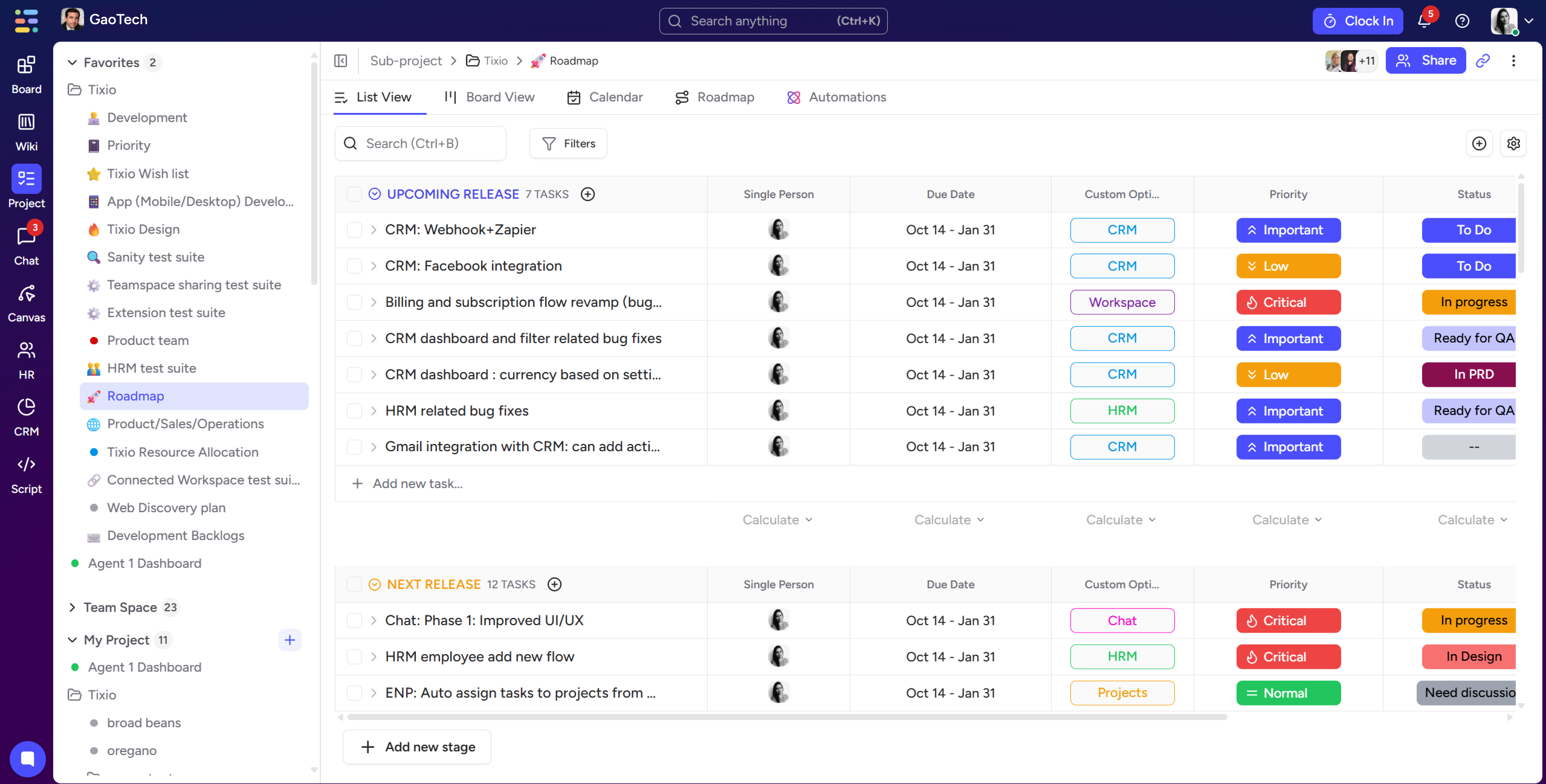
ClickUp markets itself as the one app to replace them all. It combines task management, docs, goals, whiteboards, and chat into a single platform. That ambition is both its strength and its challenge.
What makes ClickUp compelling:
- Comprehensive project management features that most standalone PM tools charge extra for
- Built-in chat so conversations happen next to the work itself
- Highly customizable views including lists, boards, Gantt charts, and calendars
- A free plan that is surprisingly capable, and paid plans starting at $7 per user per month
Where ClickUp struggles:
- The sheer number of features creates a steep learning curve
- Some users report performance issues and occasional bugs
- Chat functionality is not as polished as dedicated messaging tools
Best for: Teams that want to consolidate project management and communication into a single tool.
5. Mattermost
Mattermost is an open-source team messaging platform aimed at technical teams and organizations with strict security requirements. It offers both cloud-hosted and self-hosted deployment options, which is a differentiator that very few competitors can match.
What makes Mattermost compelling:
- Self-hosting option gives full control over data and infrastructure
- Strong fit for DevOps teams with integrations for GitHub, GitLab, Jira, and more
- Compliance-ready with features for HIPAA, GDPR, and government regulations
- Open-source core with a transparent development roadmap
Where Mattermost struggles:
- Less polished user experience compared to Slack
- Requires technical resources to set up and maintain self-hosted deployments
- Smaller integration marketplace than Slack or Teams
Best for: Engineering teams, government agencies, and organizations with data sovereignty requirements.
6. Twist
Twist, made by the team behind Todoist, takes a deliberately async-first approach to team communication. It uses threads as the primary organizing structure rather than channels, which forces more intentional communication.
What makes Twist compelling:
- Designed to reduce notification pressure and encourage focused work
- Thread-based structure keeps conversations more organized than channel-based tools
- Good fit for distributed teams across time zones
- Straightforward pricing with a free tier and a paid plan at $6 per user per month
Where Twist struggles:
- Not designed for real-time communication, which can frustrate teams used to Slack
- Smaller feature set and integration library
- Less name recognition means a harder internal sell
Best for: Remote-first and async-first teams that want to escape the always-on communication culture.
Side-by-Side Comparison: Key Metrics
Here is a quick reference for how these tools compare on the factors that matter most to most teams.
- Slack: Best integrations, strong search, expensive at scale, no native task management
- Microsoft Teams: Best for Microsoft 365 users, powerful video, complex interface
- Google Chat: Best value for Google Workspace teams, limited integrations
- Notion: Best for knowledge management and async work, not a real-time messaging tool
- ClickUp: Best all-in-one for PM-heavy teams, steep learning curve
- Mattermost: Best for security and self-hosting, requires technical setup
- Twist: Best for async-first culture, limited integrations and features
How to Actually Choose the Right Tool for Your Team
Comparison guides are useful, but the honest answer is that the best tool depends on your team's specific situation. Here is a framework I use when advising teams on this decision.
Step 1: Audit Your Current Stack
List every tool your team uses for communication and project management. If you are already paying for Google Workspace or Microsoft 365, the built-in collaboration tools might be good enough. Adding Slack on top of an existing ecosystem often means paying twice for overlapping capabilities.
Step 2: Identify Your Biggest Pain Points
Is your team struggling with information being scattered across too many places? You probably need better documentation and knowledge management, which points toward Notion or Confluence. Is the issue that work and conversation are disconnected? You might benefit from ClickUp or a similar integrated platform. Is the problem notification overload and lack of focus? Consider an async-first tool like Twist.
Step 3: Consider Team Size and Growth Trajectory
A startup with eight people has very different needs than a company with 800. At small scale, almost any tool works. At larger scale, pricing, permissions, and governance matter much more. Think about where you will be in two years, not just where you are today.
Step 4: Run a Structured Pilot
Pick two or three options and run a 30-day pilot with a real team or project. Measure adoption, gather feedback, and look at actual usage data rather than relying on gut feel. The tool that wins in a real pilot is almost always the right choice.
The Real Cost of Getting This Wrong
Switching collaboration tools is disruptive. It requires data migration, training, and the inevitable period where half the team is on the old tool and half is on the new one. A 2023 survey by Productiv found that large enterprises use an average of 473 SaaS applications, and tool sprawl is one of the leading causes of productivity loss.
Getting this decision right the first time matters. But so does being willing to change when a tool is genuinely not working. The sunk cost of staying on a bad tool is always higher than the switching cost of moving to a better one.


.jpg)
.jpg)

.jpg)
One app for everything!