.png)
Pocket is gone. Mozilla announced the shutdown on 22 May 2025, the app stopped working on 8 July 2025, and accounts were deleted after the export deadline on 8 October 2025. Fifteen years of saved articles, closed on a three month notice.
If you are reading this with a Pocket export sitting in your downloads folder, or with a bookmark bar that has quietly become your new read it later list, here are seven alternatives that are actually alive in 2026, and which one fits which habit.
What happened to Pocket, briefly
Mozilla shut down Pocket and Fakespot in the same announcement as part of a refocus on Firefox. There was no acquisition and no handover. Users had until October 2025 to export their saves, after which accounts and data were deleted.
The lesson is not that Pocket was bad. It was excellent for a decade. The lesson is that a free service holding a decade of your reading is a dependency, and dependencies need an export plan. Whichever tool you pick next, check that it can export your data in a standard format before you pour three years of links into it.
What to look for in a Pocket replacement
Pocket did four things well. Any real replacement needs at least three of them.
- One click save from any browser, ideally with a mobile share sheet too
- A clean reader view that strips ads and layout junk
- Search that actually reaches the text of what you saved, not just titles
- An export path so you are never trapped again
Two things Pocket never did well, and which you should decide whether you need: sharing a collection with other people, and keeping saved links next to the work that uses them.
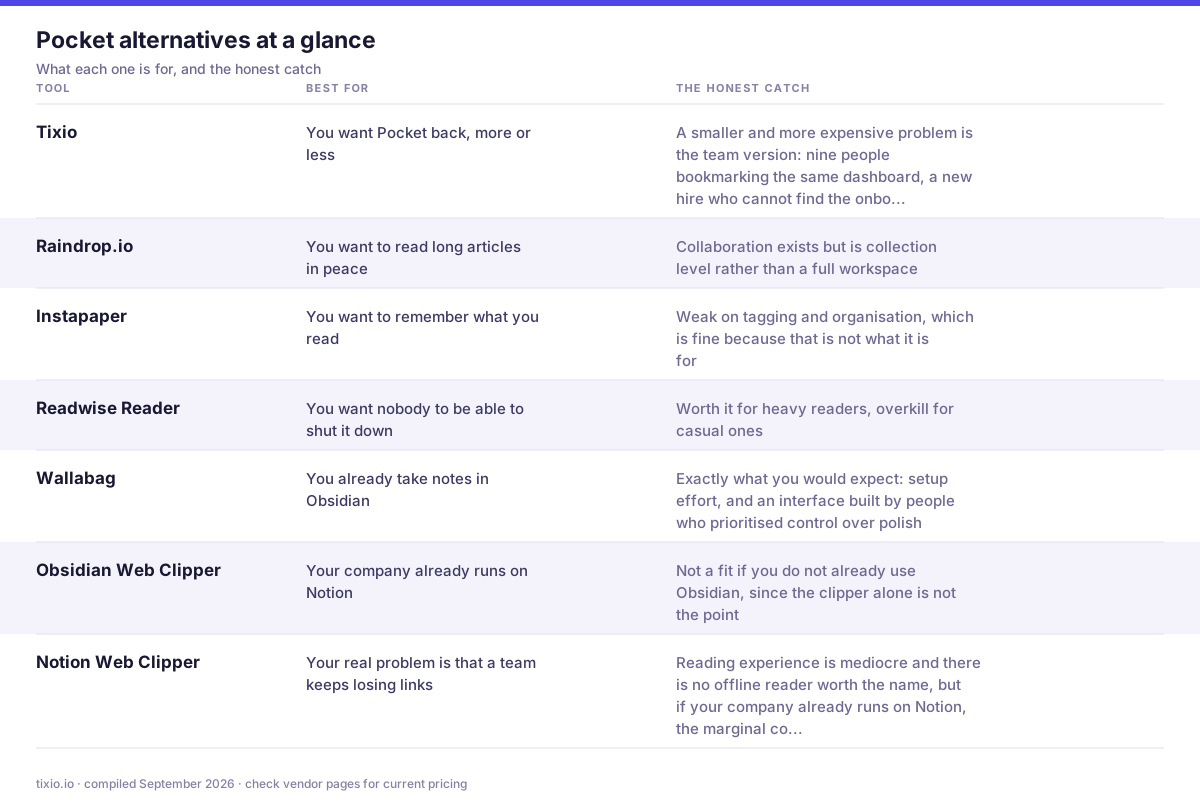
The whole list in one view, including the part most comparison posts skip.
The 7 best Pocket alternatives in 2026
1. Tixio, best if your links are a team problem
Most Pocket refugees are solving a personal reading problem. A smaller and more expensive problem is the team version: nine people bookmarking the same dashboard, a new hire who cannot find the onboarding doc, and a client folder that lives in one account manager's browser.
Tixio handles shared bookmarks alongside chat, docs and projects in one workspace, so a link sits next to the work that uses it instead of in a separate app nobody opens. You get shared collections, permissions, search across the workspace, and a start page that puts your daily tools one click away. It is not a reader first tool, so if you mainly want a distraction free article view, one of the options below will suit you better.
- What it does well: saved links sit in the same workspace as chat, docs and tasks, so a link dropped in a channel gets filed into a shared board instead of dying in the scroll.
- Where it bites: it is not a reader. No offline text-only view, no highlights, no Kindle send. A personal reading habit is better served further down this list.
- Best for: teams who kept sending each other Pocket links and then losing them.
Pricing: 14 day free trial, no card required. Starter $2.80 per user per month billed annually ($4 monthly), Team $6.30 per user per month annually ($9 monthly), Enterprise on request. Tixio pricing
2. Raindrop.io, the closest like for like swap
Raindrop is the default recommendation for a reason. It imports Pocket exports cleanly, has apps everywhere, supports nested collections, tags, full text search on the paid tier, and a genuinely good visual view if you save a lot of design and video links. The free tier is generous enough to live on. Collaboration exists but is collection level rather than a full workspace.
- What it does well: nested collections, tags, a one click browser extension, and a bulk importer that eats the Pocket HTML export without complaint.
- Where it bites: full text search, permanent page copies and bigger uploads are Pro only, so the free tier finds titles but not the sentence you half remember.
- Best for: the person who wants Pocket back, only tidier.
Pricing: free plan covers unlimited bookmarks, collections and devices with 100MB of uploads a month. Pro runs around $28 to $38 a year depending on where you buy it, roughly $2.99 a month in-app. Raindrop.io and its pricing page
3. Instapaper, the purist reader
Instapaper predates Pocket and outlived it. Text first, fast, minimal, with highlights, notes and a proper Kindle send. If what you miss about Pocket is sitting down and reading long articles without a browser fighting you, this is the closest feeling. Weak on tagging and organisation, which is fine because that is not what it is for.
- What it does well: the cleanest reader view of the group, speed reading, text to speech, Kindle send and a genuinely fast mobile app.
- Where it bites: the free tier allows only five notes a month, and full text search plus the permanent archive are Premium.
- Best for: people who save things to actually read them, not to build a library.
Pricing: free with unlimited saves and sync. Premium is $5.99 a month or $59.99 a year. Instapaper and its premium page
4. Readwise Reader, best for people who actually re-read
Reader combines a read it later inbox with highlights, notes, RSS, newsletters, PDFs and YouTube transcripts, then feeds everything into a spaced repetition review. If your problem is that you save things and never look at them again, this is the only tool on this list designed specifically to fix that. It is a paid product with no meaningful free tier, and it is the most complex option here. Worth it for heavy readers, overkill for casual ones.
- What it does well: an inbox for articles, PDFs, newsletters, YouTube transcripts and Twitter threads, with highlights that sync into Obsidian, Notion and Roam.
- Where it bites: no free tier at all, and Reader is not included in the cheaper Lite plan, so the real entry price is the Full plan.
- Best for: people who re-read, quote and write from what they save.
Pricing: no free plan, 30 day trial. Readwise Full is $9.99 a month billed annually ($12.99 monthly) and includes Reader. Lite at $5.59 does not. Students get 50% off on request. Readwise Reader and pricing
5. Wallabag, the self hosted escape hatch
Open source, self hostable, with a paid hosted option if you do not want to run a server. Wallabag imports Pocket exports, has mobile apps and browser extensions, and cannot be shut down by a corporate refocus because you own the instance. The trade off is exactly what you would expect: setup effort, and an interface built by people who prioritised control over polish.
- What it does well: open source, self hostable, exports everything, and nobody can shut it down on three months notice.
- Where it bites: the interface looks its age and self hosting means you own the backups, the upgrades and the 2am fix.
- Best for: anyone whose main lesson from Pocket was never again.
Pricing: self hosting is free under AGPL. The hosted wallabag.it service is about 11 euros a year, roughly $12, which is closer to a donation than a subscription. wallabag and hosted pricing
6. Obsidian Web Clipper, best if your notes are already the system
If you already live in Obsidian, the official Web Clipper saves pages as markdown into your vault, where they sit alongside your notes and become searchable with everything else. Your saved articles stop being a separate inbox and become part of one library in plain files on your own disk. Not a fit if you do not already use Obsidian, since the clipper alone is not the point.
- What it does well: clips the page into markdown in your own vault, with templates, so the saved article is a note you can link, tag and search alongside everything else.
- Where it bites: there is no queue, no unread state and no cross device sync unless you pay for Sync or wire up your own.
- Best for: people whose notes are already the system and who want the article inside it.
Pricing: the app and the clipper are free. Obsidian Sync is $4 per user per month billed yearly, and any company of two or more people using it for work needs the $50 per user per year commercial licence. Obsidian and pricing
7. Notion Web Clipper, best if the team already pays for Notion
Practical rather than exciting. The clipper drops pages into a Notion database where you can tag, filter, comment and share them. Reading experience is mediocre and there is no offline reader worth the name, but if your company already runs on Notion, the marginal cost of using it for links is zero and the sharing is already solved.
- What it does well: clips straight into a Notion database, so saved links inherit properties, filters and views, and the whole team can see the same queue.
- Where it bites: the clipper is a plain page grab. No reader mode, weak on paywalled or heavy pages, and Notion search on a big workspace is slow.
- Best for: teams already paying for Notion who want one less tool.
Pricing: the free plan is enough for personal clipping. Plus is $10 per member per month and Business $20, both on annual billing, with monthly running about 20% higher. Notion and pricing
Which one should you pick
- You want Pocket back, more or less: Raindrop.io
- You want to read long articles in peace: Instapaper
- You want to remember what you read: Readwise Reader
- You want nobody to be able to shut it down: Wallabag
- You already take notes in Obsidian: Web Clipper
- Your company already runs on Notion: Notion Web Clipper
- Your real problem is that a team keeps losing links: Tixio
How to import your Pocket export
If you exported before October 2025, you have a zip or HTML file. Most tools take it directly.
- Unzip the export if needed. Pocket exports as an HTML file of links, plus a CSV in some versions
- In your new tool, look for Import in settings, then choose Pocket or Bookmarks HTML file
- Import, then spot check that tags and archived items came through, because tag support varies a lot between tools
- Do a first pass cleanup before you commit. A Pocket archive is usually 70 percent things you were never going to read, and importing all of it just moves the guilt to a new app
If you missed the export deadline, the data is gone. Rebuild from your browser history and bookmarks, and treat it as an unplanned but effective cleanup.
Related reading
Related reading: the 9 best bookmark managers in 2026 for the full field, Raindrop.io alternatives if Raindrop is your shortlist, and team bookmark management if the links belong to a company rather than a person.
The short version
Raindrop.io is the safe swap, Instapaper is the reader, Readwise Reader is for people who re-read, Wallabag is for people who never want this to happen again, and Tixio is for when the links belong to a team rather than a person. Whichever you choose, export it once in the first week so you know the exit exists.








