You've heard the pitch. You're curious. But before you hand over a card number, you want to know exactly what you're walking into.
Fair. That's a smart way to evaluate any tool.
Tixio's free trial gives you real, hands-on access to the platform — not a watered-down demo with half the buttons greyed out. This article walks you through everything that's included, what's actually worth testing, and whether Tixio is the right fit for your team.
So, What Exactly Do You Get in the Free Trial?
No credit card required. No gotcha moment at the end of day two.
You get full access to the platform for 14 days. Your team can sign up, start working, and genuinely stress-test the product before committing to anything.
The goal is straightforward: you should know whether Tixio works for your team before you pay a cent.
Chat, Projects, Wikis, and More — All Unlocked
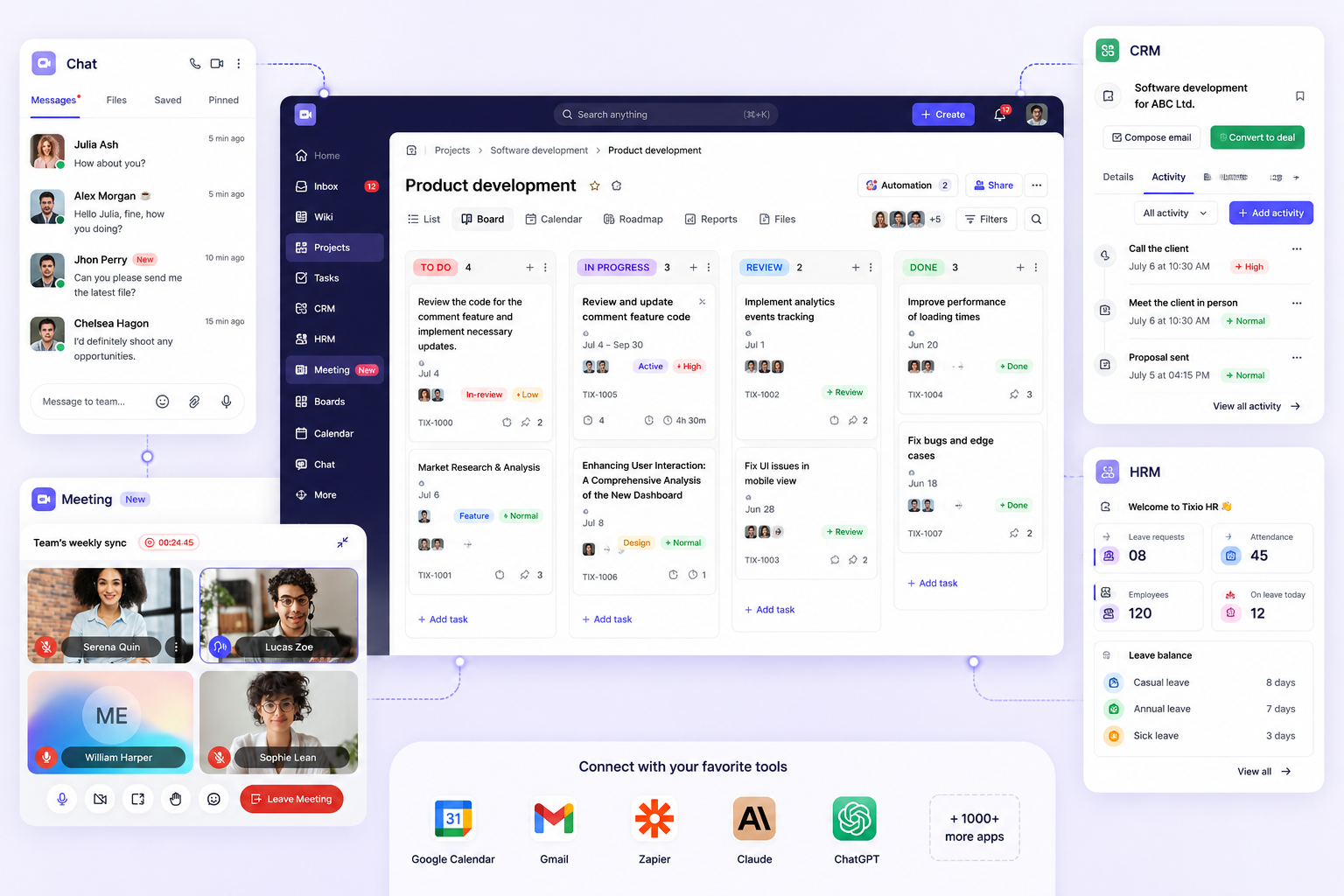
Tixio isn't a single-purpose tool. It's a team collaboration platform built to replace the pile of apps your team currently juggles — chat, project management, documentation, whiteboards — all in one place.
Here's what you get full access to during the trial:
Team Chat That Actually Keeps Up
- Channels for teams, projects, or topics
- Direct messages and group threads
- File sharing so attachments don't disappear into email
- Meeting support built right in
No more "did you see my message?" moments scattered across three different apps.
Project Management Without the Spreadsheet Chaos
Tixio's project module covers the full workflow — from first idea to shipped deliverable:
- Kanban boards for visual task tracking
- Roadmaps for planning across time
- Calendar views so nothing sneaks up on you
- Task and subtask tracking with assignments and due dates
- Automations to handle the repetitive stuff
Want to go deeper on how project work fits together before you start? The guide to project management is worth a read before you set up your first board.
Wikis for the Knowledge Your Team Keeps Losing
Every team has that document. The one buried in someone's Google Drive, last edited 18 months ago, that nobody can find when they actually need it.
Tixio's wiki feature lets you build a proper internal knowledge hub — with comments, embeds, and structure that actually makes sense. Your processes, onboarding docs, and SOPs stay findable.
Canvas for Visual Thinkers
The collaborative canvas is Tixio's whiteboard — but smarter. Embed items, build flowcharts, think through ideas visually. No switching to a separate tool required.
The HR and CRM Add-Ons: Worth a Look
Here's where Tixio gets interesting for teams that want to go beyond basic project work.
Tixio HR
The HR add-on handles the operational side of managing people:
- Attendance tracking
- Leave management
- Payroll
- Contracts
- Onboarding workflows
If HR admin is eating your week, this is worth testing during the trial. It's not a full HRIS (Human Resources Information System) replacement for enterprise, but for small-to-mid-sized teams it handles the day-to-day without needing a separate tool.
Tixio CRM
The CRM (Customer Relationship Management) add-on brings your sales pipeline into the same workspace as everything else:
- Leads management
- Deal pipelines
- Email and calendar integration
- Activity tracking
No more toggling between your project tool and your CRM to figure out where a deal stands. It's all in one place.
How Tixio Stacks Up Against the Usual Suspects
You're probably comparing Tixio to at least one or two other tools right now. Here's an honest look at where it sits relative to the common alternatives.

Most tools do one or two of these things well. Tixio's bet is that doing all of them in one place — without stitching together five different subscriptions — saves you real time and real money.
That's the whole premise behind the product, actually. The story of why Tixio was built is worth reading if you want to understand the thinking behind it.
Who Gets the Most Out of the Trial?
Tixio works best for teams that are currently:
- Paying for too many tools and tired of watching the monthly bill creep up
- Losing context because work is scattered across chat, docs, and project apps that don't talk to each other
- Growing fast and need HR and CRM features without buying separate platforms
- Remote or hybrid and need one reliable place for async communication and documentation
If you're a solo freelancer who just needs a task list, Tixio might be more than you need. But if you're running a team — even a small one — the all-in-one approach starts to make a lot of sense pretty quickly.
How to Make the Most of Your 14 Days
A trial is only useful if you actually put it through its paces. Here's a practical approach:
Days 1–2: Set up your workspace
- Invite your core team
- Create channels for your main projects or departments
- Build one wiki page — your team handbook or a key process doc is a good starting point
Days 3–7: Run a real project through it
- Set up a live project with tasks, owners, and due dates
- Use the Kanban board for daily standups or status updates
- Test the canvas for a brainstorm or planning session
Need a framework for structuring that project setup? The guide to project planning gives you a solid starting point.
Days 8–14: Test the add-ons
- If you manage people, turn on the HR module and run through attendance and leave requests
- If you have a sales pipeline, set up a few deals in the CRM and track them through stages
- Check the automations — even one or two configured correctly can save you hours a week
By day 14, you'll know whether Tixio fits. Not because someone told you it would, but because you've actually used it.
Ready to Start? Here's What Happens Next
Signing up takes about two minutes. No credit card, no commitment.
You're in, you invite your team, and you start working. If Tixio clicks, you pick a plan. If it doesn't, you walk away with no bill and a clear answer.
That's the deal.
Start your free trial at tixio.io — 14 days, full access, no card required.
FAQs
Do I need a credit card to start the Tixio free trial? Nope. You can sign up and access the full trial without entering any payment details.
How long is the Tixio free trial? 14 days, with full access to the platform the entire time.
What features are included in the trial? Everything — team chat, project management, wikis, canvas, and the HR and CRM add-ons. You're not testing a limited version.
Can I invite my whole team during the trial? Yes. Invite your team during the trial period so you can test Tixio the way you'd actually use it day-to-day.
What happens when the trial ends? You can choose a paid plan to keep going. If you decide not to, your account pauses and you won't be charged anything.
Is Tixio a good fit for small teams? Yep. Tixio works well for small teams, agencies, and growing businesses — especially ones that want to stop paying for five separate tools. The all-in-one setup tends to make more sense the more people you have collaborating.
How does Tixio compare to tools like ClickUp or Notion? Tixio covers more ground in a single platform — particularly with built-in chat, HR, and CRM features that tools like Notion and monday.com don't include natively. The comparison table above breaks it down feature by feature.








