-1.png)
The best study tools and note taking apps for students in 2026 are Notion for organising a whole degree, Obsidian if you want to own your files forever, Anki for anything you must memorise, Zotero for citations, Google Docs for group work, and Tixio if you are running a group project that needs shared everything rather than shared documents.
One warning before the list. The most common study productivity mistake is spending week one building a beautiful system and week twelve realising you never used it. Pick two tools, not seven, and give yourself a term before changing anything.
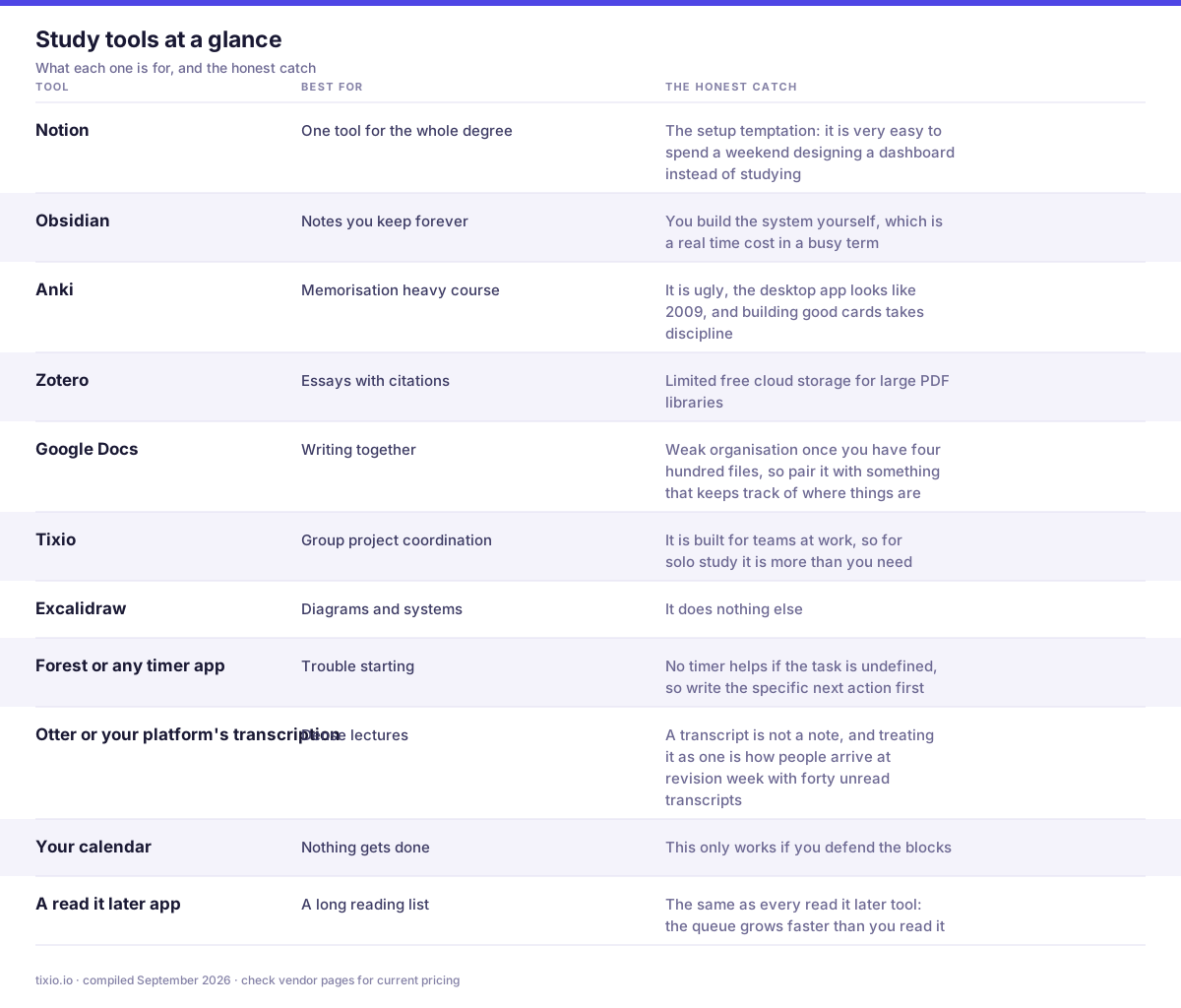
The whole list in one view. The right hand column is the part most comparison posts leave out.
12 tools worth your time
1. Notion, for running the whole degree
Databases for modules, assignments, deadlines and readings, all linked, all in one place. The free plan for students is generous and this is where most people should start if they want one tool holding everything. The catch is the setup temptation: it is very easy to spend a weekend designing a dashboard instead of studying.
- What it does well: one place for modules, deadlines, reading lists and notes, with database views that turn a chaotic term into a filtered list of what is due this week.
- Where it bites: building the system is more fun than using it, so budget one afternoon and then stop. It is also slow offline, which matters in a lecture hall basement.
- Best for: students who want a single dashboard for the whole degree.
Pricing: the free plan is genuinely enough for one student, and students and educators can get Notion Plus free with a verified school email. Plus is otherwise $10 per member per month and Business $20, both annual. Notion and pricing
2. Obsidian, for notes you will still have in ten years
Plain markdown files on your own disk, linked together, with a graph showing how ideas connect. Genuinely excellent for subjects where understanding the connections is the assessment. Free for personal use. The catch is that you build the system yourself, which is a real time cost in a busy term.
- What it does well: plain markdown on your own disk, so notes from first year still open in final year, and links between notes show you the connections a module list never will.
- Where it bites: sync across laptop and phone is not free, and the plugin ecosystem is a rabbit hole that will eat a weekend if you let it.
- Best for: anyone doing a research heavy degree who wants the notes to outlive the course.
Pricing: the app is free on desktop and mobile with no limits. Sync is $4 per user per month billed yearly, Publish $8 per site per month. Student use is personal use, so no commercial licence is needed. Obsidian and pricing
3. Anki, for anything you have to memorise
Spaced repetition flashcards, and the only tool on this list with decades of evidence behind the underlying method. If your course involves vocabulary, anatomy, formulae, dates or definitions, this outperforms rereading by a wide margin. The catch is that it is ugly, the desktop app looks like 2009, and building good cards takes discipline.
- What it does well: spaced repetition that is genuinely evidence backed. Twenty minutes a day beats six hours the night before, and shared decks exist for most medical and language courses.
- Where it bites: making good cards is a skill, and downloaded decks are usually worse than the ones you write yourself.
- Best for: medicine, law, languages and anything with a large factual load.
Pricing: free and open source on Windows, macOS, Linux and Android, with free AnkiWeb sync. The iOS app is a one off $24.99 purchase that funds everything else. Anki and AnkiMobile
4. Zotero, for citations and sources
Free, captures references from almost any page in one click, stores PDFs, and generates bibliographies in whatever style your department demands. Learn this in first year and it pays back every year after. See the best reference management software for how it compares. The catch is limited free cloud storage for large PDF libraries.
- What it does well: one click capture of a source with correct metadata, then a formatted bibliography in whatever style your department insists on, straight inside Word or Google Docs.
- Where it bites: 300MB of free storage disappears quickly if you save PDFs, and group libraries share that quota.
- Best for: every student writing anything with a reference list.
Pricing: the software is free and open source forever. Storage only: 2GB $20 a year, 6GB $60, unlimited $120, or point it at your university's WebDAV and pay nothing. Zotero and storage
5. Google Docs, for group work
Boring and correct. Real time collaboration that works on any device, comment threads, version history, and everyone already has an account. The catch is weak organisation once you have four hundred files, so pair it with something that keeps track of where things are.
- What it does well: nobody has to install anything, version history saves the group when someone deletes a section at 2am, and comments are still the best way to review a draft.
- Where it bites: no structure between documents, so a term's worth of group files becomes an unnavigable Drive folder by week nine.
- Best for: group essays, reports and anything with more than one author.
Pricing: free with a personal Google account, and most universities provide Workspace for Education free. Paid business plans start at $7 per user per month, which students rarely need. Google Docs and Workspace pricing
6. Tixio, for group projects that are more than a document
Group projects fail on coordination rather than writing. Who is doing what, where the shared sources are, what was decided in the meeting three weeks ago. Tixio keeps shared links, tasks, docs and chat in one workspace, so a group of five stops losing things across four apps and a chat group. The catch is that it is built for teams at work, so for solo study it is more than you need.
- What it does well: keeps the group project's tasks, chat, files and links in one place, so coordination stops happening across three group chats and a shared folder nobody can find.
- Where it bites: it is a paid tool for something a WhatsApp group technically does, so it earns its place on longer projects rather than a two week assignment.
- Best for: dissertations, capstones and society or club work that runs for a term or more.
Pricing: 14 day trial, no card. Starter $2.80 per user per month billed annually ($4 monthly), Team $6.30 annually ($9 monthly). Worth asking about student and society rates. Tixio pricing
7. Excalidraw, for diagrams and thinking on a page
Free, instant, and hand drawn in style, which keeps early diagrams looking provisional so you are willing to change them. Excellent for processes, systems and anything you need to draw to understand. The catch is that it does nothing else.
- What it does well: free, instant, no account, and the hand drawn style keeps a half formed diagram looking like a draft instead of a conclusion.
- Where it bites: the free version does not save your work anywhere permanent, so export or you will lose it.
- Best for: working through a proof, a system or an essay structure visually.
Pricing: the open source editor at excalidraw.com is free forever. Excalidraw Plus, which adds saved scenes and folders, is $6 per user per month billed annually ($7 monthly). Excalidraw and Plus pricing
8. Forest or any timer app, for actually starting
The Pomodoro pattern of twenty five minutes on and five off is genuinely effective, mostly because it lowers the cost of starting. Any timer works. The catch is that no timer helps if the task is undefined, so write the specific next action first.
- What it does well: removes the hardest part, which is the first five minutes. A timer running is a surprisingly effective commitment device, and Forest adds a small guilt mechanic on top.
- Where it bites: none of these apps make you study. They make starting easier, and that is the whole claim.
- Best for: anyone who opens their laptop and finds three hours have gone.
Pricing: Forest is a $3.99 one off on iOS and free with in app purchases on Android. Free alternatives that do the same job include Pomofocus and your phone's built in timer, which costs nothing at all.
9. Otter or your platform's transcription, for lectures
A transcript means you can listen properly instead of frantically typing. Search the transcript afterwards for the bit you half remember. The catch is that a transcript is not a note, and treating it as one is how people arrive at revision week with forty unread transcripts.
- What it does well: a searchable transcript means you can listen in the lecture instead of transcribing it, and you can jump to the ten seconds where the assessment was explained.
- Where it bites: accuracy drops with accents, jargon and bad room audio, so treat it as a searchable record rather than a substitute for attending. Always check your institution's recording policy first.
- Best for: dense lectures, seminars and anything where the reading list is announced verbally.
Pricing: Otter Basic is free with 300 transcription minutes a month. Pro $8.33 per user per month billed annually ($16.99 monthly), Business $19.99 annually. Students get 20% off Pro with a .edu address, and Teams, Zoom and Google Meet include transcription your university may already pay for. Otter.ai and pricing
10. Your calendar, used properly
Underrated and free. Block study time as events rather than keeping a to do list, because a task without a time is a wish. The catch is that this only works if you defend the blocks.
- What it does well: it is the only tool here that forces a decision about when, not just what. A deadline in a task list is a wish, a two hour block on Tuesday is a plan.
- Where it bites: it only works if you defend the blocks, and the first two weeks of doing this honestly are unpleasant reading.
- Best for: everyone, and it costs nothing.
Pricing: free with Google Calendar, Apple Calendar or Outlook, all of which your university almost certainly already provides.
11. A read it later app, for the reading list
Course readings, articles and papers land in one queue with a clean reader view instead of forty open tabs. Pocket closed in 2025, so see the best Pocket alternatives. The catch is the same as every read it later tool: the queue grows faster than you read it.
- What it does well: stops the reading list living in fourteen open tabs. Save now, read on the bus, and only the useful ones go into your notes.
- Where it bites: the field split after Pocket shut down in 2025, so you are choosing between a reader and a filer.
- Best for: courses with heavy reading where the papers arrive faster than you can read them.
Pricing: Instapaper is free with unlimited saves, Premium $5.99 a month or $59.99 a year. Raindrop.io is free for unlimited bookmarks with Pro around $28 a year. Readwise Reader needs the Full plan at $9.99 a month annually, with 50% off for students on request. Instapaper, Raindrop.io, Readwise Reader
12. A paper notebook
Worth saying plainly. Handwriting is slower, which forces summarising rather than transcribing, and summarising is where the learning happens. Many students take better lecture notes on paper and organise digitally afterwards. The catch is that paper is not searchable, so photograph the pages that matter.
Choosing in one line each
- One tool for the whole degree: Notion
- Notes you keep forever: Obsidian
- Memorisation heavy course: Anki
- Essays with citations: Zotero
- Writing together: Google Docs
- Group project coordination: Tixio
- Diagrams and systems: Excalidraw
- Trouble starting: any timer app
- Dense lectures: transcription
- Nothing gets done: your calendar
- A long reading list: a read it later app
- Lecture notes that stick: paper
The study habits that beat any tool
- Test yourself instead of rereading. Retrieval practice is the most reliably supported finding in the study literature, and rereading is the most popular thing that does not work
- Space it out. Four one hour sessions across four days beats one four hour session, for the same total time
- Write in your own words. If you cannot explain it without the slides, you have not learned it, you have recognised it
- Name the next action. Study biology is not a task. Make ten Anki cards from lecture six is a task
- Keep one inbox for everything unprocessed, and clear it weekly. Two inboxes means none
- Do the hardest thing first, when your attention is worth the most
Group projects, specifically
Group work fails in predictable ways and almost none of them are about the actual work.
- Nobody owns anything, so everybody assumes somebody else is doing it. Assign one name per deliverable in the first meeting
- The shared sources live in one person's browser, and disappear when they go quiet. Put them somewhere everyone can open
- Decisions get made in a chat group and are unfindable by week three
- Everything is in a document nobody has permission to edit, which you discover the night before submission
Fix those four and the project runs. Every tool recommendation above is downstream of them.
Related reading
Related reading: 9 best reference management software tools, personal knowledge management, and how to bookmark a page on any browser or phone.
The short version
Pick two tools and use them for a whole term before changing anything. Test yourself instead of rereading, because rereading is the popular thing that does not work. And in group projects, assign one name per deliverable in the first meeting, since almost every group failure is a coordination failure rather than a work failure.








