.png)
The best content curation tools in 2026 are Feedly for monitoring sources at scale, Raindrop.io for personal collecting, Tixio when the curation feeds a team rather than an audience, Pocket's successors for reading, Notion for turning collections into published pages, and Buffer or Hootsuite when the output is social posts.
Content curation is the work of finding, filtering, organising and republishing other people's material with your own judgement attached. The judgement is the product. The tools only decide how much time you spend on the mechanical parts around it.
The four stages, and why one tool never covers them
Most people buy a tool for one stage and then wonder why the others still hurt.
- Discovery. Finding material worth your attention without reading the whole internet. RSS readers, newsletters, alerts, social listening
- Capture. Getting it out of the browser and into somewhere you will find it again. Browser extensions, read it later tools, bookmark managers
- Organisation. Tagging, sorting, and adding the note that explains why you saved it. This is the stage people skip and then regret
- Distribution. Turning the collection into a newsletter, a social post, an internal brief or a resource page
A stack usually needs two tools, occasionally three. Anyone selling you one tool for all four stages is compromising on at least two of them.
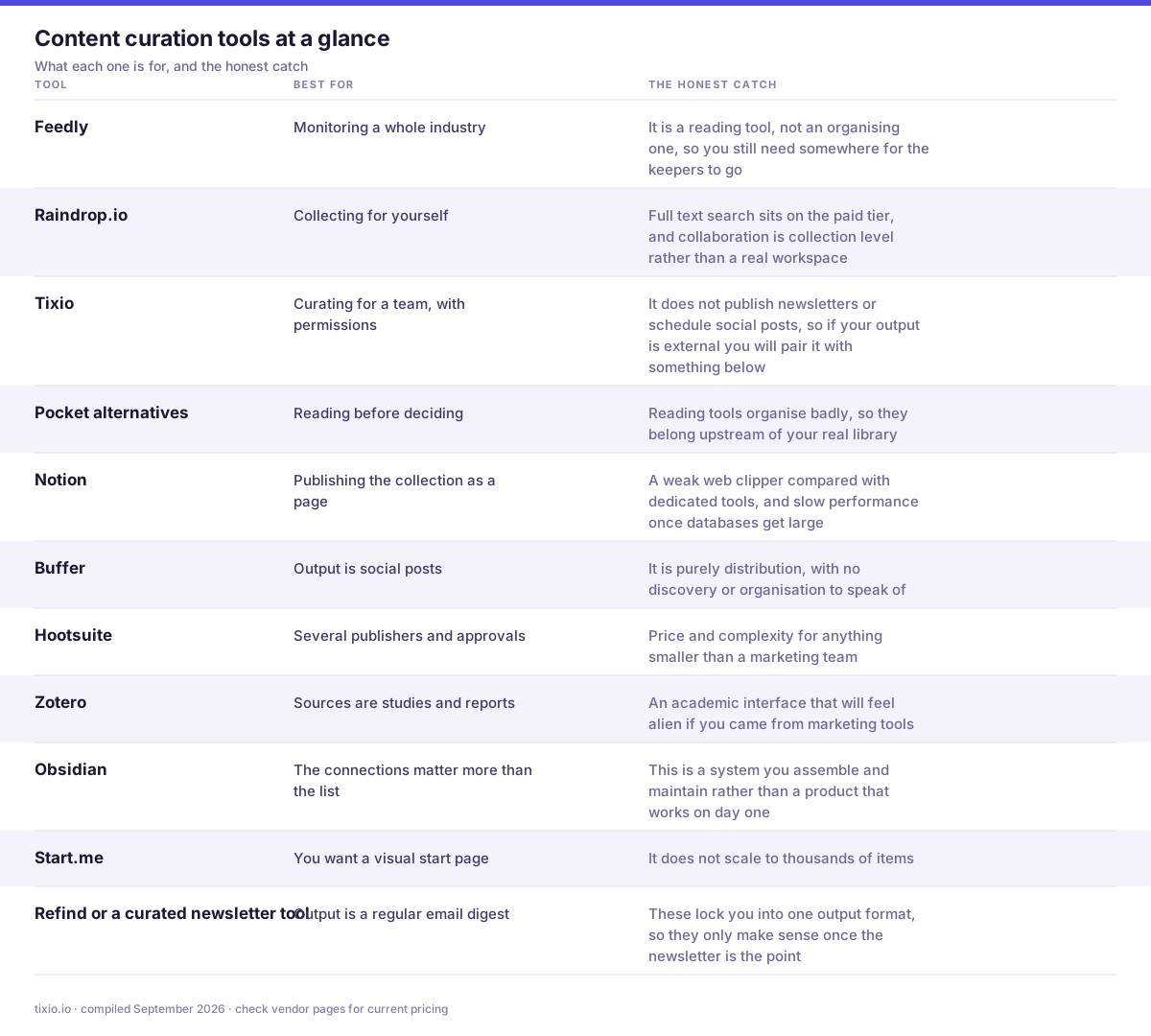
The whole list in one view. The right hand column is the part most comparison posts leave out.
11 content curation tools worth knowing
1. Feedly, for discovery at scale
The strongest option for monitoring a large number of sources without drowning. RSS at its core, with AI assisted filtering that learns what you skip. Essential if you track an industry rather than dip into it. The catch is that it is a reading tool, not an organising one, so you still need somewhere for the keepers to go.
- What it does well: monitors hundreds of sources without you opening them, with AI feeds that filter by topic, competitor or keyword rather than by publication.
- Where it bites: the free plan is capped at 100 sources with no search and no integrations, and the AI filtering that makes it worth having is Pro+ only.
- Best for: analysts and marketers tracking an industry rather than a reading list.
Pricing: free for 100 sources and 3 folders. Pro about $6 a month billed annually, Pro+ about $8.25 a month billed annually, Enterprise from roughly $1,600 a month on quote. Confirm current figures on the page. Feedly and pricing
2. Raindrop.io, for personal collecting
The best all round personal capture tool: fast browser extension, nested collections, tags, and a visual grid that suits design and video references. The catch is that full text search sits on the paid tier, and collaboration is collection level rather than a real workspace.
- What it does well: the best personal capture tool here. Fast extension, nested collections, tags, duplicate detection and broken link checking.
- Where it bites: full text search and permanent page copies are Pro only, and collaboration is a bolt on rather than a permission model.
- Best for: individuals building a reference library they will return to.
Pricing: free plan covers unlimited bookmarks, collections and devices with 100MB of uploads a month. Pro runs around $28 to $38 a year depending on where you buy, roughly $2.99 a month in-app. Raindrop.io and pricing
3. Tixio, when the curation is for a team
Most curation advice assumes an audience of strangers. A great deal of real curation is internal: a competitor file, a research folder, a swipe file of campaigns that worked, a reading list for the team. That material needs permissions and shared search, not a publishing pipeline. Tixio keeps curated links alongside the docs, chat and projects that use them, so a saved article sits next to the work it informs. The catch is that it does not publish newsletters or schedule social posts, so if your output is external you will pair it with something below.
- What it does well: curation that a team can actually use, with shared collections sitting beside the chat, docs and tasks where the work happens.
- Where it bites: no RSS monitoring, no publishing tools and no social scheduling. It holds the collection rather than sourcing or distributing it.
- Best for: internal curation, where the audience is colleagues rather than strangers.
Pricing: 14 day trial, no card. Starter $2.80 per user per month billed annually ($4 monthly), Team $6.30 annually ($9 monthly), Enterprise on request. Tixio pricing
4. Pocket alternatives, for reading before deciding
Pocket closed in 2025, and its replacements handle the read first, decide later stage that curation depends on. Instapaper for clean reading, Readwise Reader if you highlight and want to revisit. See the best Pocket alternatives for the full comparison. The catch is that reading tools organise badly, so they belong upstream of your real library.
- What it does well: separates saving from deciding. You capture now, read properly later, and only the survivors get filed, which is the step most curation workflows skip.
- Where it bites: the field split after Pocket closed, so you are choosing between a filer and a reader rather than getting both.
- Best for: anyone whose collection is full of things they never actually read.
Pricing: Instapaper is free with unlimited saves, Premium $5.99 a month or $59.99 a year. Readwise Reader needs the Full plan at $9.99 a month billed annually. Wallabag is free self hosted, about 11 euros a year hosted. Instapaper, Readwise Reader, wallabag
5. Notion, for turning collections into pages
Strong when the curated set becomes something published: a resource page, an internal wiki section, a public list. Databases with views mean the same items can be a table, a gallery or a board. The catch is a weak web clipper compared with dedicated tools, and slow performance once databases get large.
- What it does well: turns a collection into something publishable. Databases with properties, filtered views and a page you can share externally in one click.
- Where it bites: no capture engine of its own beyond a basic clipper, and search gets slow once the workspace is large.
- Best for: turning a saved set into a resource page other people read.
Pricing: free plan with block limits on multi member workspaces. Plus $10 per member per month, Business $20, both annual, monthly around 20% higher. Notion and pricing
6. Buffer, for social distribution
If curation ends in social posts, Buffer handles scheduling and queueing cleanly with far less overhead than enterprise suites. The catch is that it is purely distribution, with no discovery or organisation to speak of.
- What it does well: the simplest way to turn curated links into scheduled posts, with a clean queue and per channel pricing that stays honest for small operators.
- Where it bites: priced per connected channel, so a six channel setup on Essentials is $30 a month, and analytics are shallow next to Hootsuite.
- Best for: solo creators and small teams publishing to a handful of channels.
Pricing: free for 3 channels and 10 scheduled posts per channel. Essentials $5 per channel per month, Team $10 per channel per month with unlimited users. Buffer and pricing
7. Hootsuite, for teams with approval workflows
Heavier than Buffer, with social listening and approval chains that matter when several people publish under one brand. The catch is price and complexity for anything smaller than a marketing team.
- What it does well: approval workflows, social listening and role based permissions, which is what agencies and regulated brands actually buy it for.
- Where it bites: by far the most expensive tool in this list, starting at $99 per user per month, with no free plan and undisclosed monthly rates.
- Best for: teams where a post has to be approved before it goes out.
Pricing: no free plan, 14 day trial. Standard $99 per user per month on annual billing, Professional $199, Advanced $399, Enterprise on request. Hootsuite and plans
8. Zotero, when curation is research
Underrated for non-academic use. Excellent metadata capture, PDF storage and group libraries, all free. Worth considering whenever the sources are studies, reports and papers rather than blog posts. The catch is an academic interface that will feel alien if you came from marketing tools.
- What it does well: the best metadata capture anywhere. One click pulls author, publication, date and the PDF, which beats every bookmark tool at knowing what a thing actually is.
- Where it bites: it is built for citation, so tags and collections feel academic, and 300MB of free storage disappears quickly with PDFs.
- Best for: research heavy curation where provenance matters more than presentation.
Pricing: the software is free and open source. Storage only: 2GB $20 a year, 6GB $60, unlimited $120, or use your own WebDAV and pay nothing. Zotero and storage
9. Obsidian, when notes are the real output
The web clipper saves pages as markdown into a vault you own, alongside your own writing. Best when the value is in the connections you make rather than the list you keep. The catch is that this is a system you assemble and maintain rather than a product that works on day one.
- What it does well: the clipper saves a full markdown copy into a vault you own, so the curated set survives whatever happens to the original site or the app.
- Where it bites: no queue, no unread state, no team sharing, and cross device access needs Sync or a setup of your own.
- Best for: people whose curation ends as writing rather than as a list.
Pricing: the app and clipper are free. Sync $4 per user per month billed yearly, and companies of two or more people need the $50 per user per year commercial licence. Obsidian and pricing
10. Start.me, for a visual dashboard
Turns a curated set into a start page with widgets and feeds, which suits a team that wants links laid out rather than searched. The catch is that it does not scale to thousands of items.
- What it does well: presents a curated set as a page people scan rather than a list they search, with widgets, RSS and shared team pages behind SSO.
- Where it bites: free is ad supported and capped at 3 pages, and it stores links rather than archiving content, so there is no full text search of saved pages.
- Best for: shared department home pages and onboarding link hubs.
Pricing: free for up to 3 pages, ad supported. PRO $25 a year, Team $25 a month billed annually including 10 user licences, Enterprise on request. Start.me and pricing
11. Refind or a curated newsletter tool, for a published digest
If the output is a regular email of links with commentary, a purpose built digest tool removes most of the assembly work. The catch is that these lock you into one output format, so they only make sense once the newsletter is the point.
- What it does well: curation as a published product. A daily or weekly email of links with commentary, which is the format that actually builds an audience.
- Where it bites: Refind hides its pricing behind a login, so there is no verifiable public number, and a newsletter is a commitment rather than a tool purchase.
- Best for: people who want the curation itself to be the output.
Pricing: Refind has a free ad supported tier, with Premium reported in the $8 to $10 a month range but not published publicly. If the output is a newsletter, budget for a sending tool as well. Refind and their site
Choosing in one line each
- Monitoring a whole industry: Feedly
- Collecting for yourself: Raindrop.io
- Curating for a team, with permissions: Tixio
- Reading before deciding: Instapaper or Readwise Reader
- Publishing the collection as a page: Notion
- Output is social posts: Buffer
- Several publishers and approvals: Hootsuite
- Sources are studies and reports: Zotero
- The connections matter more than the list: Obsidian
- You want a visual start page: Start.me
- Output is a regular email digest: a dedicated digest tool
A curation workflow that survives a busy month
The failure mode is always the same: capture is easy, so the library grows, and the organising never happens. Three rules prevent it.
- Tag at save time, never later. Later is a lie. A saved item with no tag and no note is an item you will not find and would not trust if you did
- Write one line about why you saved it. This is the single highest value habit in curation, and it takes four seconds. It is also what survives when the link rots and the source disappears
- Review weekly, not daily. Fifteen minutes to promote the keepers into the shared library and delete the rest. Anything that survives two reviews without being used gets deleted
The metric that matters
Not how much you save. How often you retrieve. A curation system that captures a hundred items a month and surfaces three is worse than one that captures fifteen and surfaces eight, because the first one is costing you attention and returning nothing. If you have not pulled something out of your library in a month, the library is a hobby rather than a tool.
Related reading
Related reading: how to build a resource library, 10 best competitive intelligence tools, and 7 best Raindrop.io alternatives.
The short version
Pick one tool for discovery and one for organisation, and stop trying to find a single product that does both well. Tag at save time and write one line explaining why. Then judge the system by how often you retrieve something, not by how much you have collected.








