.png)
The best Miro alternatives in 2026 are FigJam if your team already uses Figma, Tixio if the board is mostly a place to think alongside your work, Excalidraw and tldraw for fast free sketching, Mural for facilitated workshops, Lucidspark for diagram-heavy teams, and Canva Whiteboards if design assets matter.
Miro is the category leader and most people who leave are not unhappy with the canvas. They are unhappy with what a whiteboard costs once every occasional participant needs a seat.
Why teams leave Miro
Three of the four reasons are commercial rather than technical.
- Per seat pricing for people who join one workshop a quarter. Whiteboards have a lot of occasional users and per seat models handle that badly
- Free plan board limits, which is a hard stop rather than a gentle nudge
- Performance on very large boards, particularly older ones with hundreds of objects
- Boards become an archive nobody revisits. A year of workshops leaves a graveyard of canvases with no search worth the name
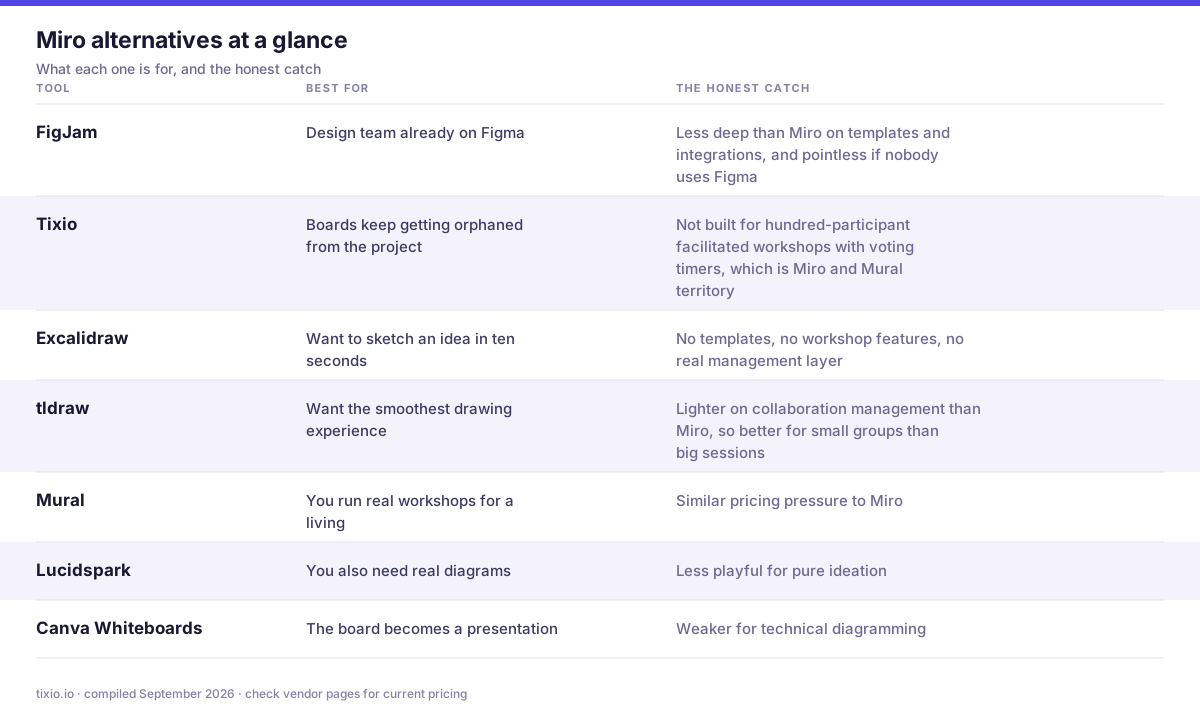
Every option below in one view. The right hand column is the part most comparison posts leave out.
The 7 best Miro alternatives
1. FigJam, if you already have Figma
The most obvious swap for any company already paying for Figma, since it shares the account, the file system and the collaboration model. Genuinely good for workshops and diagramming. Less deep than Miro on templates and integrations, and pointless if nobody uses Figma.
- What it does well: the cheapest real swap if design already uses Figma. Whiteboarding, diagramming and workshop templates, with design files one click away in the same account.
- Where it bites: it is not a standalone product, so you are inside Figma's seat model, and it is lighter than Miro on facilitation tooling like voting and timers.
- Best for: companies already paying for Figma who want to stop paying Miro as well.
Pricing: free Starter plan. On Professional, FigJam is covered by the cheapest Collab seat at $3 per user per month billed annually ($5 monthly), so you do not need $16 Full seats to whiteboard. Organization Collab seats are $5, Enterprise $5, both annual only. FigJam and pricing
2. Tixio, thinking space next to the work
The most common whiteboard failure is not the drawing, it is that the board ends up in a separate tool from the project it belongs to, so nobody finds it again. Tixio keeps a canvas in the same workspace as projects, docs and chat, so the output of a session sits with the work it fed. It is not built for hundred-participant facilitated workshops with voting timers, which is Miro and Mural territory.
- What it does well: puts the canvas next to the tasks, docs and chat, so what gets decided on the board turns into work instead of a screenshot pasted somewhere.
- Where it bites: fewer facilitation features than Miro or Mural. No voting timers, no advanced workshop templates, no infinite template library.
- Best for: teams whose boards go stale because nothing downstream ever picks them up.
Pricing: 14 day trial, no card. Starter $2.80 per user per month billed annually ($4 monthly), Team $6.30 annually ($9 monthly), Enterprise on request. Tixio pricing
3. Excalidraw, free, fast, hand drawn
Free, open source, instantly usable, with a deliberately hand drawn style that keeps early ideas looking provisional. Perfect for quick architecture sketches. No templates, no workshop features, no real management layer.
- What it does well: free, open source, instantly usable with no account, end to end encrypted, and the hand drawn style keeps early ideas looking deliberately unfinished.
- Where it bites: the free version has no cloud persistence, no folders and no access control. Plus is what buys saved scenes, permissions and comments.
- Best for: engineers sketching architecture who want a link, not a licence.
Pricing: the open source editor at excalidraw.com is free forever and self hostable. Excalidraw Plus is $6 per user per month billed annually ($7 monthly) with a 14 day trial. Excalidraw and Plus pricing
4. tldraw, the fastest canvas
Very fast and pleasant to draw on, open source, with an increasingly interesting set of AI features. Lighter on collaboration management than Miro, so better for small groups than big sessions.
- What it does well: the smoothest drawing feel of anything here, source available on GitHub, and an SDK teams embed into their own products.
- Where it bites: commercial licensing is value based and quote only rather than a published per seat price, so budgeting means a conversation. There is a 100 day trial and a hobby licence on application.
- Best for: product teams who want a canvas inside their own app, and individuals who just want a fast scratchpad.
Pricing: free for personal and hobby use, with a free hobby licence on application. Commercial SDK licensing is value based and quote only, with a 100 day free trial and startup discounts. tldraw and licensing
5. Mural, for facilitated workshops
The closest direct competitor, with facilitation as the focus: timers, voting, private mode and structured session tooling. Often preferred by people whose actual job is running workshops. Similar pricing pressure to Miro.
- What it does well: the closest direct competitor, built around facilitation. Timers, voting, private mode, clustering and the best structured workshop templates in the category.
- Where it bites: the free plan allows only 3 editable murals, the same trap as Miro, and unlimited external collaborators plus SSO only arrive at Business.
- Best for: facilitators, design sprints and workshops with people from outside the company.
Pricing: free plan with 3 editable murals and unlimited view only visitors. Team+ $9.99 per user per month billed annually ($12 monthly), Business $17.99 annually, Enterprise on request. Mural and pricing
6. Lucidspark, for diagram-heavy teams
Pairs with Lucidchart, so a loose brainstorm can become a formal diagram in the same ecosystem. Strong for technical and process documentation. Less playful for pure ideation.
- What it does well: pairs with Lucidchart, so a messy brainstorm can become a proper architecture or process diagram without moving tools.
- Where it bites: the free plan caps at 3 editable boards, the trial is 7 days and requires a card, and the pricing page does not state whether the listed prices are monthly or annual.
- Best for: diagram heavy teams in ops, IT and engineering who already use Lucidchart.
Pricing: free plan with 3 editable boards. Individual about $9, Team about $10 per user, Enterprise on request, with the billing period not stated on the page, so confirm at checkout. Lucidspark and pricing
7. Canva Whiteboards, if design output matters
Included with Canva, so the whiteboard connects to a large template and asset library. Useful when the session output has to become a presentation or a deliverable. Weaker for technical diagramming.
- What it does well: the whiteboard sits inside the design tool, so a workshop output can become a polished deck, poster or social asset without exporting anything.
- Where it bites: it is a Canva feature rather than a serious collaboration canvas. Weaker facilitation, weaker diagramming and weaker integrations than Miro.
- Best for: marketing teams whose whiteboards usually end up as something designed.
Pricing: free plan for one person with 5GB storage. Pro $180 a year, about $15 a month, Business $250 per person a year, about $20.83 a month, Enterprise on request. Canva and pricing
Choosing in one line each
- Design team already on Figma: FigJam
- Boards keep getting orphaned from the project: Tixio
- Want to sketch an idea in ten seconds: Excalidraw
- Want the smoothest drawing experience: tldraw
- You run real workshops for a living: Mural
- You also need real diagrams: Lucidspark
- The board becomes a presentation: Canva
How to actually decide
Feature lists all look the same at this point in the search. These four questions separate the shortlist faster than another comparison table.
- How many people join a board once a quarter? That number times a per seat price is the real cost, and it is why most teams leave
- Do you facilitate or do you sketch? Facilitation needs timers and voting. Sketching needs speed and nothing else, and the two shortlists barely overlap
- What happens to a board after the session? If the answer is nothing, you need boards attached to projects, not a better canvas
- Do you already pay for Figma or Canva? If yes, you probably already own a whiteboard
Before you migrate
Miro exports boards as PDF, image or a proprietary backup file, and none of those import cleanly anywhere else. The realistic move is to export active boards as images for reference and rebuild only the templates you use repeatedly. Most teams discover they have three templates and two hundred boards nobody will open again, which makes the migration much smaller than it looks.
One note on pricing. Every vendor on this list has changed its plans in the last eighteen months, so treat any price you read anywhere, including here, as a starting point and check the vendor's own page before you commit a budget.
More comparisons
- 8 best Notion alternatives in 2026
- 8 best ClickUp alternatives in 2026
- 8 best Slack alternatives in 2026
- 9 best team wiki software tools in 2026
- Best work management software: the full comparison index
The short version
FigJam if you already pay for Figma. Excalidraw or tldraw if you just want to sketch. Mural if facilitation is the job. Tixio if boards keep getting orphaned from the projects they belong to. And count your occasional participants before you renew anything priced per seat.








